Why Scheduling Is Harder Than It Looks — And What It Means for AI Agents
Scheduling looks like a solved problem. Pick a date, pick a time, confirm. How hard can it be?
After a decade building scheduling software for thousands of real businesses — salons, clinics, chains, multi-location operations — I can tell you: it is one of the most deceptively complex problems in software. And every AI agent that needs to book a real human is about to discover this the hard way.
What Makes Scheduling So Complex?
Scheduling complexity is not about storing availability. It is about correctly computing availability — in real time, across multiple overlapping rule sets, with exceptions that can contradict each other, in different time zones, months into the future.
Most developers underestimate this until they are deep in production and their agent is double-booking people, ignoring holidays, or returning slots that don't actually exist.
The complexity comes in five distinct layers. Each one compounds the others.
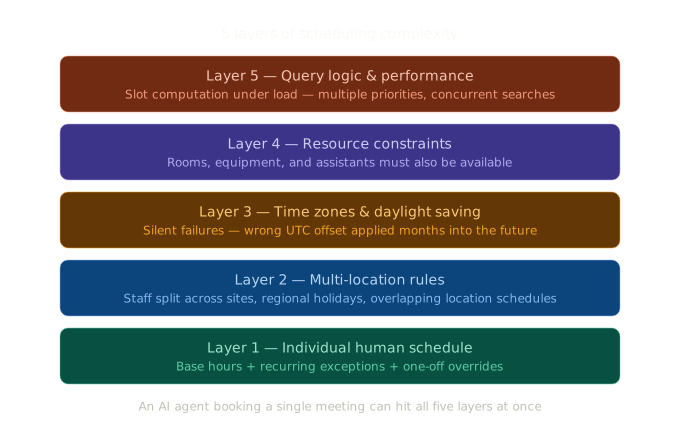 The five layers of scheduling complexity
Layer 1: The Human's Own Schedule Is Already Complicated
A single employee at a salon or clinic does not have one simple schedule. They have a base schedule plus a stack of exceptions on top of it.
Consider a typical case:
- Base hours: Monday to Friday, 9am–6pm
- But: every Tuesday and Thursday they're unavailable 12pm–2pm
- But: every other Monday they don't work at all
- But: they're on holiday for two weeks in August
- But: on December 28th they agreed to take a one-off extra shift
Each of these rules can override the previous one. Computing "is this person available at 11am on Tuesday the 14th?" requires evaluating all of them in the correct order. A naive implementation gets this wrong.
The patterns that break most scheduling systems include:
- Recurring exceptions — "Every first Monday of the month I'm unavailable"
- Date-specific overrides — "Just this one Thursday I'm working an extra hour"
- Holiday handling — Public holidays that vary by country, region, and even city
- Rolling time off — Two weeks' vacation starting mid-month, crossing month boundaries
Layer 2: Location Schedules Compound the Problem
When you add locations, each layer of human schedule complexity is multiplied by the number of locations — and then by the interactions between them.
A doctor might work Monday and Wednesday at one clinic, Tuesday and Thursday at another. A hairdresser might cover two salons in the same city, splitting their day between them. A nail technician might be shared across three locations depending on demand.
The correct available slot for a booking is the intersection of:
- The location's opening hours
- The employee's base schedule
- The employee's exceptions for that day
- Which location the employee is physically at during that time window
Get any one of those wrong, and you've either blocked a valid slot or — worse — created a booking that's impossible for the human to fulfill.
For chains with multiple cities, regional public holidays add another variable. A location in Edinburgh has different bank holidays than one in London. Both are "UK" businesses, but their availability calendars are different.
Layer 3: Time Zones Introduce Silent Failures
Time zone bugs are particularly dangerous because they don't fail loudly. The booking goes through. The confirmation email looks correct. And then the human and the attendee show up an hour apart.
Two specific problems that trap most implementations:
Daylight saving time transitions. If a booking is made in January for an appointment in April, the UTC offset for that location will be different in April than it was in January. The slot that was computed correctly in winter may be wrong by an hour in summer. Every slot generated for future dates must account for the offset that will be in effect at that future date, not today's offset.
Cross-timezone bookings. The person booking an appointment and the person being booked are frequently in different time zones. A customer in Los Angeles booking a slot with a professional in New York needs to see slots in their own local time — but the system needs to store and check availability in the professional's local time. Mixing these up produces subtle bugs that are hard to reproduce and hard to debug.
Layer 4: Resources Beside the Human Must Also Be Available
This layer surprises most developers building their first scheduling system.
A massage therapist being available is not sufficient for a massage appointment to be bookable. The treatment room must also be available at the same time. If there are two therapists and one room, you can only have one booking at a time — regardless of how many humans are free.
The same pattern appears across many industries:
| Industry | Human | Additional resource required |
|---|---|---|
| Dental clinic | Dentist | Treatment room + dental assistant |
| Hair salon | Stylist | Styling chair |
| Recording studio | Engineer | Studio room + equipment |
| Medical clinic | Doctor | Examination room |
| Physiotherapy | Therapist | Treatment table in private room |
A booking system that only tracks human availability will overbook shared resources. In practice, this means clients arriving to find no available room, or two patients scheduled in the same chair.
Layer 5: The Query Logic Itself Is Expensive
Even after correctly modeling all the rules, querying availability efficiently is its own problem.
When a customer searches "show me available slots next week", the system must:
- Load all relevant availability rules for the human (or humans)
- Generate every candidate slot in the date range
- Filter out slots blocked by working-day rules
- Filter out slots blocked by time-of-day rules
- Filter out slots blocked by specific date exceptions
- Filter out slots already taken by confirmed bookings
- Filter out slots where required resources are unavailable
- Return only what remains
At low volume, this is manageable. Under load — hundreds of concurrent searches, large date ranges, multiple locations — naive implementations bring databases to their knees. The query patterns required for correct and efficient slot computation are non-trivial.
This gets worse when the search itself has multiple priorities. A customer might say: "I want a 60-minute appointment with this specific person." Or: "I need any available slot this week, I don't mind who." Or: "I want this specific service — find me the earliest slot regardless of provider." Each query shape requires different logic to compute correctly.
What This Means for AI Agents
AI agents that need to schedule real humans will face every one of these problems.
An AI sales agent booking a demo call needs to know which sales reps are actually available — not just what their standard hours are, but whether they're on leave, whether they have back-to-back calls already, whether the slot is realistic given travel time between their previous meeting.
An AI recruiting tool scheduling interviews needs to coordinate across multiple interviewers, room bookings, and candidate time zones — months in advance, accounting for daylight saving transitions.
An AI customer support agent escalating to a human needs to find a genuinely available slot in real time, without creating conflicts, and fire a confirmation that all parties receive correctly.
The scheduling problem does not get simpler because an AI agent is doing the booking. If anything, the stakes are higher — agents book at scale and at speed, which means a bug in the scheduling logic creates many bad bookings very quickly.
The Two Wrong Solutions Developers Reach For First
Google Calendar / Outlook Calendar API. These are storage APIs, not availability APIs. They tell you what events exist; they do not compute whether a given slot is free given a set of rules. You can build on top of them, but you're building all the complexity described above from scratch.
Calendly or similar consumer tools. These are designed for humans clicking links, not for programmatic consumption by agents. Their APIs are afterthoughts. They don't expose the kind of rule-based availability computation an agent needs, and they're not designed for the query patterns agents use.
Neither is a scheduling layer. They're adjacent tools that developers press into service because nothing purpose-built existed.
Frequently Asked Questions
Why can't an AI agent just use a calendar link? A calendar link (like Calendly) works for humans choosing their own appointment. An AI agent needs to select a specific slot programmatically, verify it's valid, confirm it atomically, and receive a webhook when the lifecycle changes. Calendar links don't support this workflow.
What is a scheduling API? A scheduling API is a service that computes availability and manages the booking lifecycle programmatically. Rather than showing a UI for a human to interact with, it exposes endpoints for software — including AI agents — to check availability, create bookings, and receive notifications.
What's the hardest part of building scheduling software? Time zones and exception rules are the most common sources of production bugs. Daylight saving transitions, cross-timezone bookings, and overlapping availability exceptions are all edge cases that appear simple but require careful implementation to handle correctly.
How do AI agents handle scheduling today? Most AI agents either drop a calendar link (which requires the human to complete the booking manually, breaking the agent workflow) or build custom scheduling logic from scratch (which takes months and recreates all the problems above). A purpose-built scheduling API for agents is a newer approach.
What is the difference between availability rules and blocked dates? Availability rules define the recurring pattern of when a human can be booked — working days, working hours, meeting durations. Blocked dates are specific exceptions to that pattern — holidays, vacation days, one-off unavailabilities. Correct scheduling requires both, applied in the right order.
Slotflow is a REST API built to solve exactly this. It lets AI agents check real availability, create bookings, and receive webhooks on booking events — without building any of the scheduling logic themselves. The free tier covers 100 bookings per month with no credit card required.